

This article may contain affiliate links. Please see our disclosure policy for more details.

Here we take a look at the best educational apps for kids and students, from the personal experience of a professional educator and homeschool mom.


Finding resources that blend education with engagement is a top priority for me. That’s why I’ve curated a list of educational apps that have made a real difference in our homeschooling journey.
These apps cover a range of subjects from math and science to reading and art, offering interactive and personalized learning experiences that keep my kids excited about discovering new things.
I’ve chosen each app for its ability to make learning fun, interactive, and effective, ensuring that my children receive a well-rounded education from the comfort of our home.
So whether you’re a homeschool parent, a classroom teacher, or just a mom looking to engage their child with meaningful screentime, check out this list for the best of the best.
Easy Navigation
Top Educational Apps for Kids and Students
1. Homer

Personal Experience: Homer has personalized the reading journey for my children, adapting to their interests and learning pace. Watching their reading skills flourish has been rewarding for both of us.
Educational Integration: Use Homer to complement your language arts curriculum, offering a personalized learning path that boosts reading confidence.
Age-Specific Recommendations: Designed for ages 2-8, Homer grows with your child, making it a versatile tool for early readers.
You can try it free here.
2. codeSpark

Personal Experience: Discovering codeSpark Academy has been a game-changer in our homeschool routine, especially for introducing my kids to the fundamentals of coding in a way that’s both fun and educational. Great for when you’re tired of doing STEM activities on paper!


The app’s story-driven approach, with its lovable characters and engaging puzzles, has made learning to code an adventure that my kids look forward to every day.
Educational Integration: codeSpark Academy is an excellent way to weave critical thinking and problem-solving skills into your daily lessons. Its emphasis on logic, sequencing, and programming concepts provides a solid STEM foundation in a playful, interactive environment.

Age-Specific Recommendations: Perfect for children ages 5-9, codeSpark Academy demystifies coding and turns it into a visual, block-based language that kids can easily grasp and enjoy.
3. Notey’s World
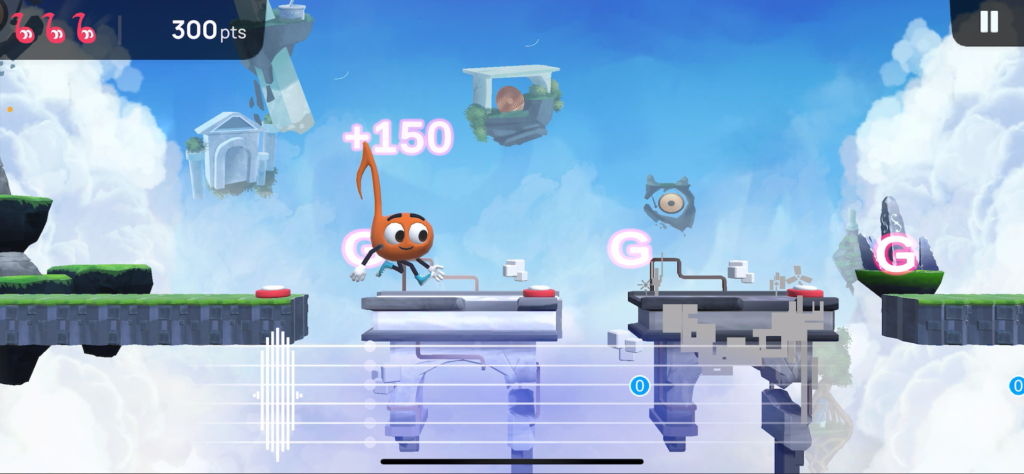
Personal Experience: As someone who loves music, I know it’s important to teach kids instruments as part of their education. And Notey’s World has to be the most fun, original app we’ve tried that teaches kids to play guitar.
It’s not just tutorials – it’s literally an adventure game that takes you through levels as you learn to play your instrument. It’s genius!
Educational Integration: Notey’s World combines gaming and music education – turning screen-time into practice time. You can easily substitute music time for Notey gameplay in your kid’s educational plan.


Age-Specific Recommendation: It’s rated for age 4+, but I think elementary and middle school-aged kids would be best suited.
Right now, we have an exclusive special for our readers – click here from your iOS device, and you can access Notey’s World premium content (more levels, game modes, and worlds to explore) free for 30 days!
You can also learn more in our Notey’s World review here.
4. ABC Mouse
Personal Experience: ABC Mouse offers a comprehensive curriculum that has been invaluable for structured learning times. Its broad range of subjects ensures a well-rounded education for preschool through elementary age.
Educational Integration: ABC Mouse can serve as the core of your curriculum for younger children or as a supplement for older kids needing reinforcement in specific areas.
Age-Specific Recommendations: Best for ages 2-8, ABC Mouse provides a scalable difficulty that’s perfect for early learning stages.
5. Khan Academy
Personal Experience: Khan Academy has been a game-changer in our homeschooling journey, offering in-depth lessons across subjects like math, science, and humanities. The progress tracking feature has been particularly helpful in keeping track of my children’s learning.
Educational Integration: Use Khan Academy to supplement any subject area. For math, align their practice exercises with your current unit study. For history and science, the videos make great introductory materials or review resources.
Age-Specific Recommendations: Suitable for all ages, with Khan Academy Kids being one of the most versatile educational apps out there.
6. Duolingo
Personal Experience: Duolingo has made language learning incredibly engaging for my kids. They love earning points and advancing through the levels, and I appreciate the structured curriculum that builds on previous lessons. The daily reminder notifications are great, as well as the gamification with the leaderboard.
Educational Integration: Incorporate Duolingo into your daily routine as a fun, interactive start to your homeschool day. It’s also a great tool for preparing for an upcoming trip to a country where the target language is spoken. We’re working on Spanish, as it’s very useful in our area of the country.
Age-Specific Recommendations: Best for ages 6 and up, thanks to its game-like learning approach.
7. Prodigy
Personal Experience: Prodigy has turned math and English into fun time, with my kids asking to play. In fact, my daughter going as far as asking for a premium subscription for Christmas! The adaptive learning path ensures they’re always challenged just enough.
Educational Integration: Use Prodigy as a reward after traditional lessons or as a fun way to practice math and language arts concepts during summer to prevent learning loss.
Age-Specific Recommendations: Ideal for students in 1st through 8th grade.
8. Epic!
Personal Experience: Epic! has been a fantastic addition to our reading resources, offering access to thousands of books. It’s especially been a hit with my reluctant reader, thanks to its interactive reading options.
Educational Integration: Epic! can be used for independent reading time, research for projects, or a source for read-alouds. Its vast library supports subjects from science to social studies.
Age-Specific Recommendations: Great for ages 4 to 12, with content tailored to each age group.
9. BrainPOP
Personal Experience: BrainPOP’s engaging videos and quizzes have been a hit, providing a quick and effective way to introduce new topics or supplement our studies with a multimedia approach. When I was in the classroom, this was my go-to app for mini-lessons – they have everything, and it’s super-engaging.
Educational Integration: Use BrainPOP as a starting point for units in science, social studies, or health. The quizzes are great for review sessions.
Age-Specific Recommendations: Suitable for ages 6-14, with BrainPOP Jr. for the younger kids.
Why Listen to Us?
At Hess Un-Academy, we’re more than just homeschooling enthusiasts; we’re a team dedicated to providing reliable, engaging, and effective educational resources. I, myself, am a former classroom teacher turned homeschool mom. So I have loads of experience with these apps.
Our recommendations, including the top educational apps, are thoroughly researched and vetted through a rigorous editorial process. This ensures that you receive advice grounded in real homeschooling experiences, backed by educational expertise.
We strive to bring you content that’s not only practical but also inspiring, to make your homeschooling journey as rewarding as possible. Trust us to guide you through the vast world of educational technology with confidence and curiosity.
Wrap Up
Wrapping up, isn’t it amazing how these apps turn tricky subjects into fun quests? From the creative coding challenges in CodeSpark Academy to conquering math with Prodigy, we’re not just teaching our kids; we’re giving them an adventure. And they make great apps for homeschool!
In our homeschooling world, blending tech with traditional learning isn’t just smart; it’s a game-changer. It’s about making education flexible, engaging, and tailored for our little learners.
And hey, if we can make homeschool fun, awesome!
So, as we mix and match our lesson plans keeps these educational apps for kids in mind. And just so you know, many are accessible from laptops too – not just phones and tablets.
Just remember – educational apps aren’t a complete replacement for learning or schooling – keep in mind those screentime rules!
Have you tried any of these? Which learning app is your favorite? Tell us in the replies.
Looking for apps for older kids? Check out our Lou Adventures review.
- Martin Luther King, Jr. Writing Prompts (2025 Update) - June 4, 2025
- 8+ Super Fun Dinosaur STEM Activities for Kids - June 4, 2025
- The 6 Best Learn To Read Programs for Kids (2025 Guide) - June 4, 2025